An AI integration can fail before a request reaches a model, while a route is processing it, or after a successful response arrives. Treating all three as “the model failed” makes a fix harder to find.
For developers connecting through RelayRouter, a useful approach is to isolate one layer at a time. For enterprise teams depending on the workflow, that same approach makes incident ownership clearer: the person debugging the route can explain which boundary failed and what the user should do next.
This guide uses a non-streaming text request on a Chat Completions-compatible route. Confirm the current route and supported features in your RelayRouter console before extending the example.
Layer 1: Verify the URL that the client actually sends
Start with the final request URL. A registration link opens an account flow. A Base URL identifies the API prefix. A request path identifies an operation. Mixing them creates failures that model changes cannot solve.
The domestic integration endpoint in the supplied RelayRouter material is:
Base URL:      https://api.relayrouter.app/v1
Request path:  /chat/completions
Final URL:     https://api.relayrouter.app/v1/chat/completions
If your current console specifies another regional endpoint, use that value. Some clients append the request path themselves; others ask for a complete URL. Inspect the client's setting so you do not accidentally produce /v1/v1 or duplicate /chat/completions.
Layer 2: Verify access without exposing the key
Confirm that the application reads the expected environment variable in the environment where it actually runs. A working local shell does not prove that a deployment has the same configuration.
Use a server-side credential and the authorization format required by the route. Log that a key was configured, never the key itself. Check permissions, account state, and any route-specific restrictions in the console.
An HTTP status is a useful clue, but the provider's error body and request identifier often carry the detail needed to distinguish causes. Keep those diagnostics in an appropriately restricted place.
Layer 3: Confirm the requested model and features
Copy a currently available model ID from the console. A display name, a model mentioned in an article, and an account-enabled route are not necessarily the same thing.
Start with plain text and stream: false. Add images, tool definitions, or structured-output options only after checking that the selected route supports them. Testing several new capabilities at once makes a failed request harder to interpret.
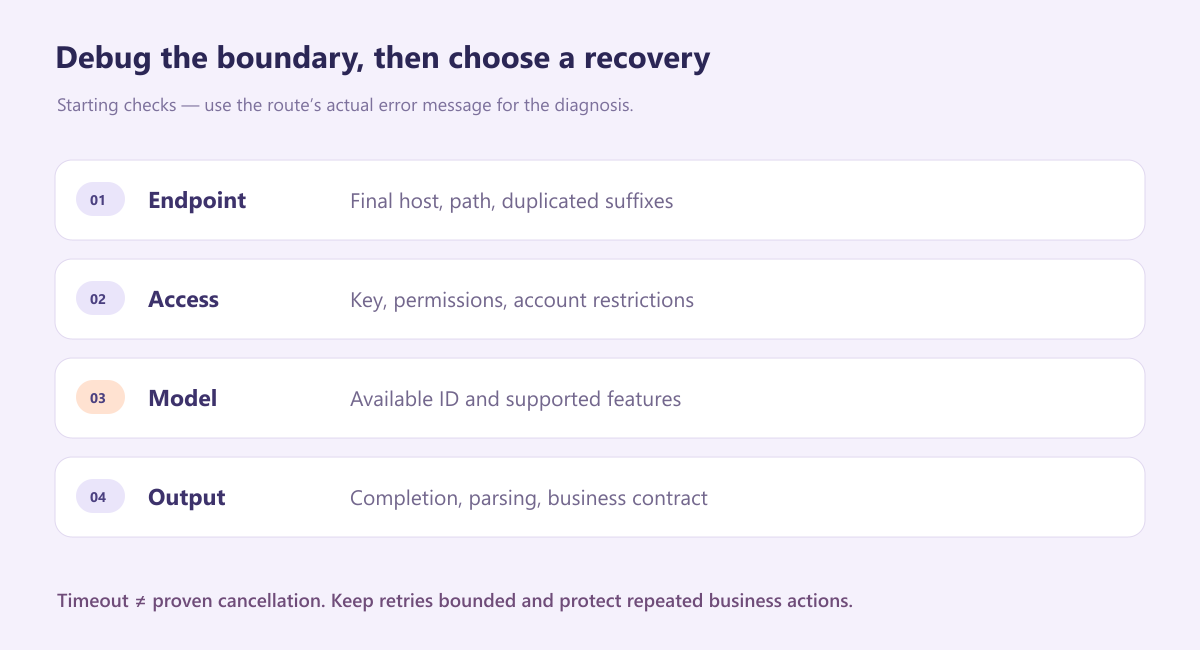
Layer 4: Run one minimal request
These PowerShell commands make the environment settings explicit. They use curl.exe so that the command calls the curl application rather than a shell alias. The payload is written as UTF-8 without a byte-order mark.
$env:RELAYROUTER_BASE_URL = 'https://api.relayrouter.app/v1'
$env:RELAYROUTER_API_KEY = 'YOUR_SERVER_SIDE_KEY'
$env:RELAYROUTER_MODEL = 'COPY_AN_AVAILABLE_MODEL_ID'

$payload = @{
    model = $env:RELAYROUTER_MODEL
    stream = $false
    messages = @(
        @{ role = 'user'; content = 'Reply with the word READY.' }
    )
} | ConvertTo-Json -Depth 6

$payloadPath = Join-Path $PWD 'relayrouter-request.json'
[IO.File]::WriteAllText(
    $payloadPath, $payload, [Text.UTF8Encoding]::new($false)
)

curl.exe --fail-with-body --silent --show-error `
    --connect-timeout 10 --max-time 90 `
    "$($env:RELAYROUTER_BASE_URL.TrimEnd('/'))/chat/completions" `
    -H "Authorization: Bearer $env:RELAYROUTER_API_KEY" `
    -H 'Content-Type: application/json' `
    --data-binary "@$payloadPath"
This payload is synthetic and does not contain business data. Keep a diagnostic request similarly small so you can distinguish configuration problems from task-specific behavior.
Layer 5: Interpret the failure before choosing a recovery
The following table gives starting points, not a universal explanation for every provider response.
| Symptom | First checks | Recovery direction |
|---|---|---|
| 400 or 422 | Request fields, message structure, feature support | Correct the request using the route's error details |
| 401 or 403 | Credential, permissions, account restrictions | Resolve access; repeating the same call is unlikely to help |
| 404 | Final URL, model ID, route availability | Check both the endpoint and the provider message |
| 429 | Rate limits, concurrency, quota or account limits | Check the error reason; wait only when appropriate |
| 5xx | Provider response, route status, request ID | Consider a bounded retry for eligible transient failures |
| Timeout | Network, client deadline, route processing | Treat outcome as uncertain before repeating work |
| 200 with unusable output | Completion state, parsing, task contract | Route the result to validation failure or human review |
For an eligible transient error, use a bounded retry policy with a deadline and jitter. Honor Retry-After when present and applicable. An exhausted quota needs a different response from a temporary rate limit.
Do not assume a timed-out request was cancelled upstream. If the workflow invokes external tools, protect those actions with application-level deduplication or appropriate idempotency controls. Do not assume the model route provides idempotency unless it is documented.
Layer 6: Check the output at the application boundary
An HTTP success means the server returned a successful response. Your application still has to check the expected envelope, completion state, content type, and business structure.
For a two-field summary object, parse JSON and require exactly the agreed fields with non-empty values. Then check meaning: does the summary match the input, and does the next action fit the business process? Keep a visible review path for uncertainty instead of converting every failure into a generic success message.
This distinction helps enterprise stakeholders too. “The API responded but the summary omitted the customer's issue” is an output-quality incident. “The requested route was unavailable” is an access or availability incident. They need different owners and different fixes.
What to keep in an incident record
Record the time, application environment, model ID, final endpoint host and path, status, duration, and a provider request ID if one is supplied. Include a small redacted reproduction when appropriate.
Avoid keys, raw authorization headers, and unnecessary personal or confidential data. Decide who can access diagnostic content and how long it should be kept. A useful incident record makes the failure reproducible without creating another problem.
A shared access point still needs an explicit runbook
RelayRouter can provide the API entry point used by your applications. Your runbook should still state where configuration lives, who owns route selection, how validation works, and what users see when a request cannot complete.
Start with RelayRouter registration, obtain an available route from the console, and run the minimal request above. When that succeeds, add one real requirement at a time. A clear failure boundary is often more useful than a larger first demo.
About the author
- Practical engineering notes on AI API integration, OpenAI-compatible migrations, multi-model workflows, AI agents, and production debugging.
Comments
Join the discussionNo comments yet. Be the first to comment.